Managing dozens of WhatsApp messages every day can be overwhelming—especially when personal and group conversations mix together on one screen. That's where GBWhatsApp steps in. With its Group Chats Segregation feature, the app makes messaging smarter and more organized, helping users easily separate personal chats from group chats for cleaner, faster communication.
What Is the Group Chats Segregation Feature?
The Group Chats Segregation feature in GBWhatsApp allows users to divide their home screen into two sections — Personal Chats and Group Chats. Instead of scrolling endlessly to find an important message, users can now switch between these tabs instantly.
This not only enhances usability but also gives users better control over their daily messaging. Whether you're chatting with friends, managing work groups, or handling multiple communities, the segregation feature saves time and reduces clutter.

Requirements to Use Group Chats Segregation
To make the most of GBWhatsApp's Group Chats Segregation feature, ensure the following:
- Update to the latest GBWhatsApp version – Older versions may not support this feature, so keeping the app current is essential. Remember to download and install the latest GBWhatsApp APK from a trusted resource.
- Enable chat separation in settings – Go to your home screen settings and activate the "Separate Group Chats" option to organize personal and group conversations.
- Use a compatible device – Most modern Android devices support this feature, ensuring smooth performance and a seamless messaging experience.
By meeting these requirements, you can fully enjoy an organized chat layout, improved focus on important conversations, and faster, more efficient messaging.
How to Enable Group Chats Segregation in GBWhatsApp
Activating this feature is simple and takes just a few steps:
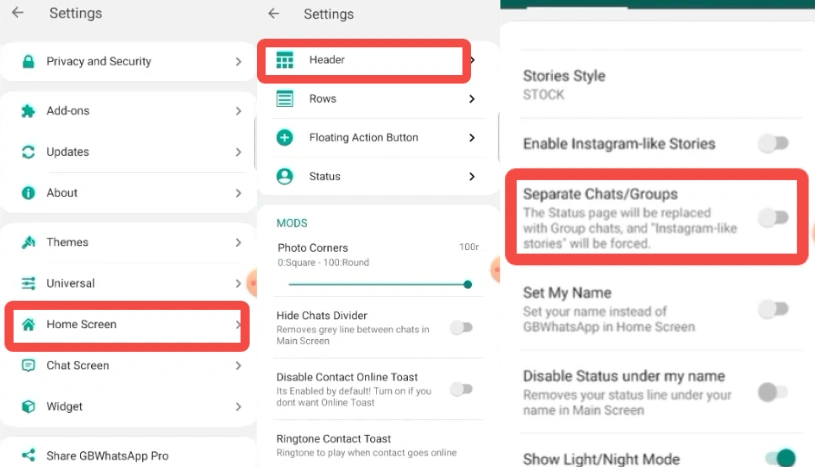
- Open GBWhatsApp and go to the Home Screen Settings.
- Tap on Header.
- Find the option labeled "Separate Chats/Group".
- Toggle the feature ON.
- Return to the home screen — you'll now see two tabs: Personal and Groups.
From now on, all your one-on-one messages will stay in the Personal tab, while group messages will automatically appear under Groups.
Why This Feature Matters
For most users, GBWhatsApp is more than a messaging app — it's a workspace, a social hub, and a daily communication tool. But when group notifications flood your chat list, finding personal messages becomes difficult.
Here's why GBWhatsApp's Group Chats Segregation is a game changer:
- Better Focus: Concentrate on personal or work messages without distraction.
- Improved Efficiency: Quickly locate any conversation, whether it's a one-on-one chat or a group discussion, and seamlessly send larger files without losing track of the context.
- Cleaner Interface: A neat and organized home screen means smoother navigation.
- Reduced Notification Stress: Handle conversations based on priority.
Whether you're managing family groups, business discussions, or online communities, this feature ensures everything stays in its place.
Perfect for Busy and Professional Users
This feature is especially useful for users who rely on GBWhatsApp for work or team communication. Instead of letting client messages get lost among casual chats, professionals can now keep business conversations neatly separated and easy to access.
For students, teachers, or community managers, the Group Chats Segregation feature also brings structure to busy messaging spaces. Study groups, club discussions, and project updates can stay organized in one place—while personal messages remain in another. The result is a smoother, distraction-free messaging experience where you can focus on what truly matters.
Final Thoughts
GBWhatsApp's Group Chats Segregation is one of those features that truly improves everyday usability. By keeping your chats organized, you save time, reduce confusion, and enjoy a more streamlined communication experience.
If you're someone who juggles multiple roles — professional, friend, student, or family member — enabling this feature will make your messaging life noticeably easier. Try it out today and experience the difference between chaos and clarity.